Have Claude check your website, no tech skills needed.
Claude is an AI assistant you chat with, like texting a helpful friend. With one quick setup, Claude can open your website the way an iPhone does, tap around like a customer would, and tell you what works and what's broken, with a picture. Setup takes about 5 minutes, you only do it once, and your first two weeks are free. Beta testers get founder pricing when paid plans open.
What you need
- A computer (setup is easiest there, then it works on your phone too)
- A Claude account. Sign up free at claude.ai
- Your website address, like mybakery.com
Pick how you use Claude
Claude app or claude.ai
The Claude desktop app and claude.ai look the same, so these steps work for both. Set it up once and it works on the Claude phone app too.
-
1. Open Claude and sign in
Open the Claude app on your computer, or go to claude.ai in your web browser. No app yet? Download it here.
-
2. Find the place to add tools
This gives Claude a phone it can use to visit websites.
- Click Customize in the left sidebar.
- Click Connectors at the top.
- Click the + Add button on the right, then Add custom connector.

-
3. Add the website tester
- In the first box, type Agent44Labs Tester.
- In the second box, copy this address and paste it in:
https://agent44labs.com/mcp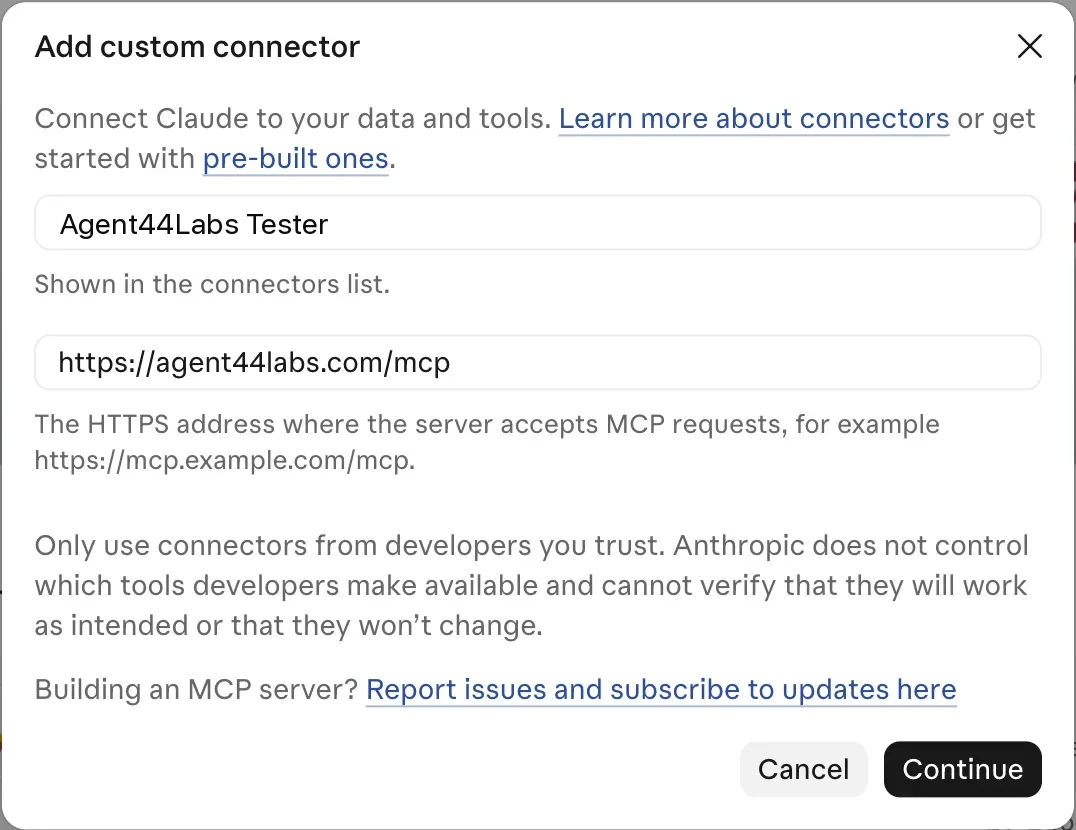
Click Continue.
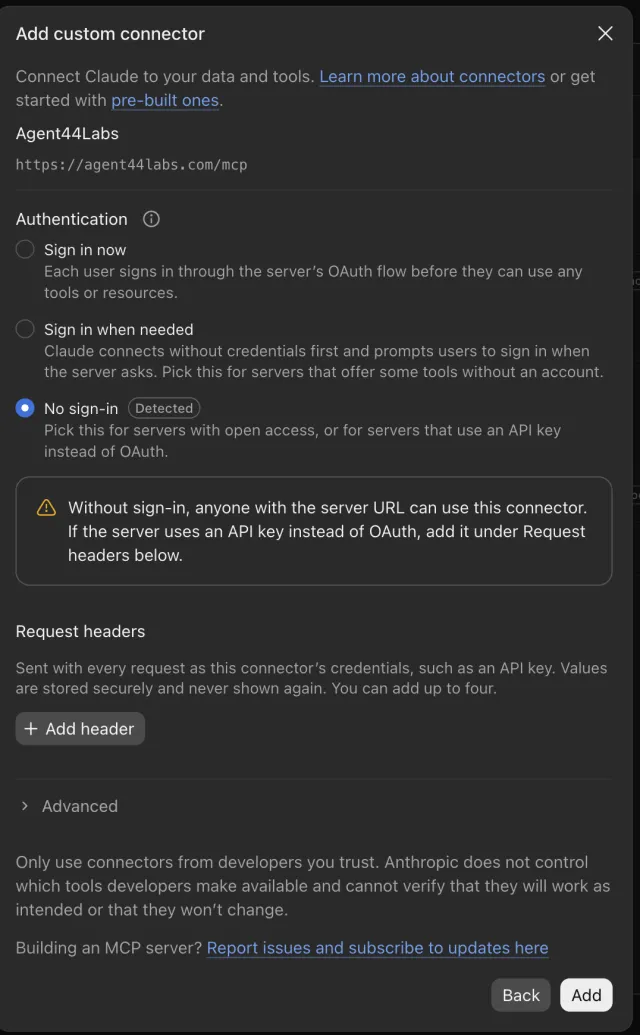
A second screen asks about sign-in. Leave No sign-in picked (it says Detected), skip the yellow note and Request headers, and click Add at the bottom. That's the hard part, done.
-
4. Start a new chat and ask
Click New, then type this, with your own website in place of mybakery.com:
Use Agent44Labs to test mybakery.com on my iPhone.No email or sign-up needed. Each website gets 4 free tests.
The first time, Claude may ask permission to use the Agent44Labs Tester. Click Allow (or Always allow).
-
5. See your result in Claude
In under a minute you see whether it passed, plus a picture of your site on the phone. If something's broken, ask Claude: "What should I fix?" A finished test looks like this:

-
6. Want it checked every night?
Click Start my 14 free nights on the result, or tell Claude "Yes, check it every night." We email you a short link to make sure it's really you (check spam if you don't see it). Click it and your site gets checked every night for two weeks, free, with each result in your inbox.
Claude Code
For people who use Claude in the Terminal app.
-
1. Add the website tester
Open Terminal, paste this line, and press Enter. You only do this once, and it works in every folder. Don't have Claude Code yet? Install it here first.
claude mcp add --scope user --transport http website-tester https://agent44labs.com/mcpTo check it worked, run
claude mcp list. You should see Connected.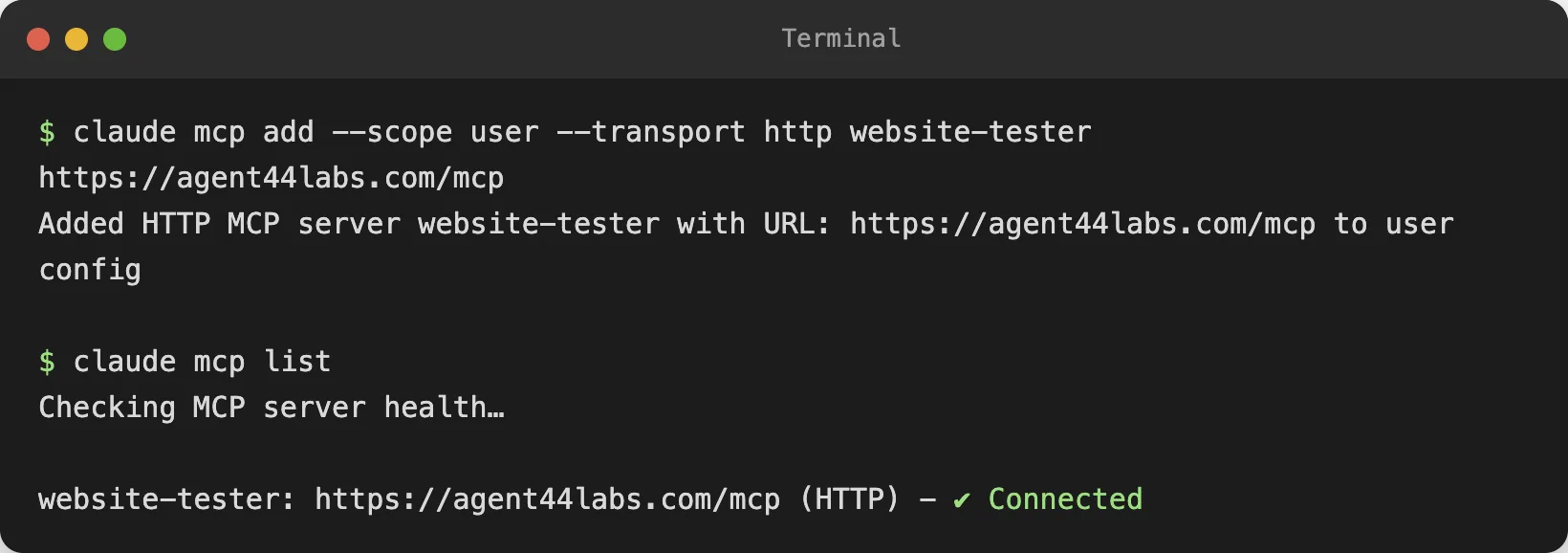
-
2. Ask Claude
Type
claudeand press Enter, then ask in plain words, like "Use Agent44Labs to test mybakery.com on my iPhone." Claude runs the test and shows the result with a link to the screenshot. No email needed, and each website gets 4 free tests. Then say "Check it every night" for two free weeks of nightly checks by email.
Questions
- Claude says it can't open websites.
- Start a new chat and make sure the Agent44Labs Tester is switched on: click the + under the message box, find Agent44Labs Tester and turn it on. Then ask again.
- Claude offers to use its own browser instead.
- Say "Use Agent44Labs." Claude's own browser only resizes a window on your computer; the Agent44Labs Tester opens your site as a phone and sends back a picture.
- My test failed but my site looks fine.
- Claude may have guessed a button that isn't there. Tell it the exact words on your page, like "Type my email in Enter your email and tap Subscribe free." Then ask it to run the test again.
- Do I need to install anything?
- No. With the Claude app or claude.ai it all runs in Claude. Only the Claude Code path uses the Terminal.
- Is it safe?
- The tester only visits public pages. Never type a real password or card number into a test. If your site needs a login, make a separate test account first.
- Rather click than chat?
- Use the website tester right here on our site. Your first test is free.
Using Cursor, ChatGPT or another AI tool? See the technical setup.